Introduction

What Appbrew Does

The company makes mobile apps for D2C Brands using Shopify. Appbrew has built & currently running apps for 200+ D2C Brands.

Appbrew opens another sales channel for Brands using Shopify

Who are the Users

Appbrew targets Shopify Brands looking for another channel to improve revenue, retention, conversion etc.

inside a Shopify Brand

brand goals

more revenue & loyalty

brand identity & web parity

integration management

decision-making users

founders

brand owners

growth marketers

execution-only users

brand designers

shopify developers

What I worked on

My job was to understand the product priorities & problem space well enough from the user insights gathered by the team, to design the most effective workflow for Brands and their desired outcomes.

Team Members

Co-Founder (CTO)

Product Manager

Engineers

The Product

How the App connects to the Product

Every Brand on Shopify goes through an onboarding process to setup their App and go live, after which Brands manage their App directly on the Product – a web-based low-code app builder.

2 stages to build & manage apps

What's relevant for this project

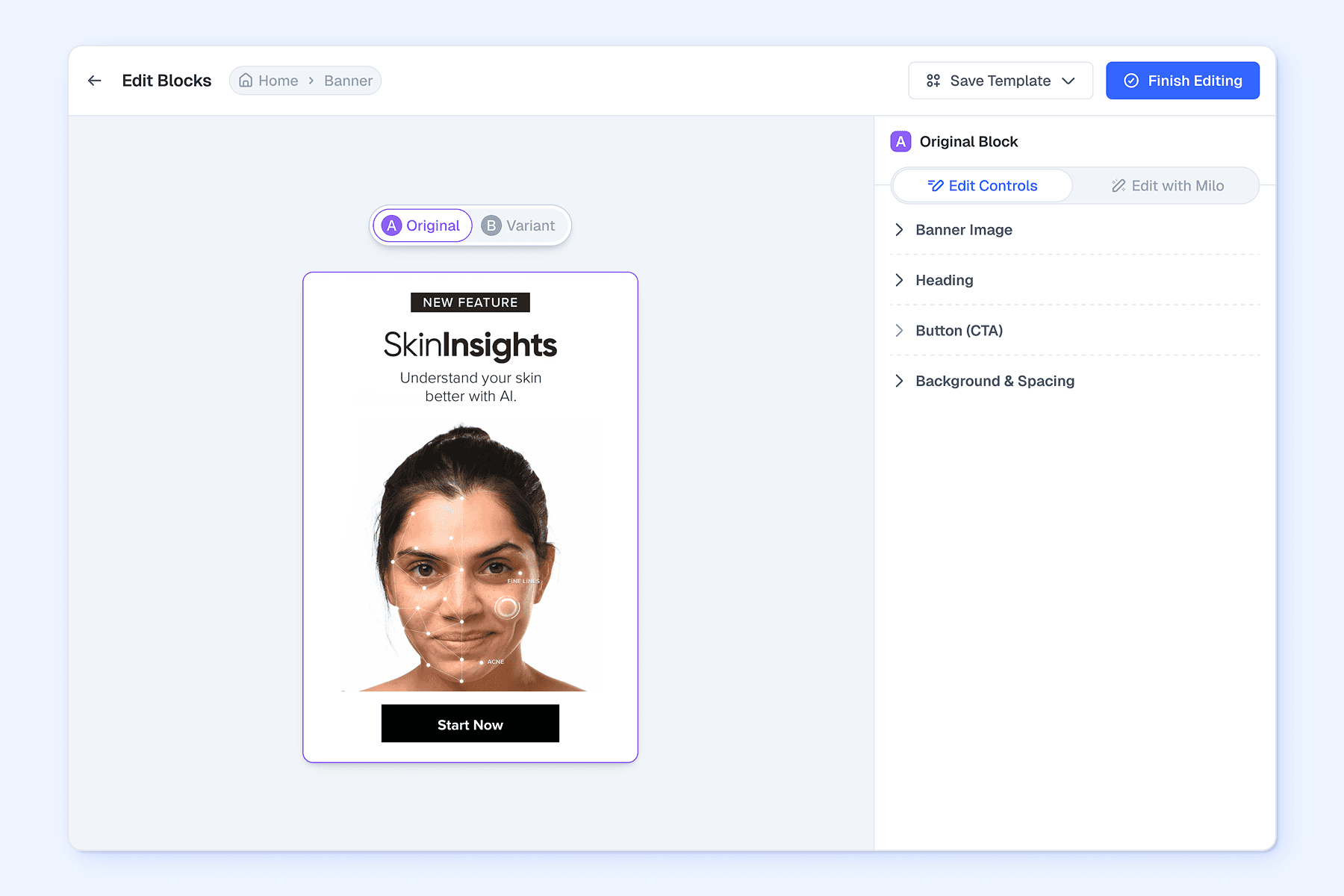
The Design section on the Product is where users manage app content, where the need to test content strategies arises.

Design Section

Pages Panel

Blocks Panel

Edit Panel

Users create or edit blocks on key pages to curate the shopping journey

Users create or edit blocks on key pages to curate the shopping journey

The Problem

What are Brands trying to achieve

Brands want to test which content leads to higher conversion or revenue on key pages of a shopping journey.

brands want to test

product discovery

what content leads to more product exploration

high-value products

what content leads to higher order amounts

creative & messaging

what content triggers buying intent over browsing

sales & events

what content sells more – pushing sales or brand building

cross-sell / upsell

what content better pads orders with related products

notifications

what content prompts higher interest to purchase

prominent blocks

what CTA or search layouts lead to more actions

reviews prompts

when review prompts lead to more & better feedback

loyalty benefits

what & where loyalty benefits lead to higher revenue

How testing worked before design

Earlier, Brands created content on the Product and tested it with either manual workarounds, or outside the Product with 3rd party tools and social media.

All tests depend on tech feasibility & availability of 3rd party tools.

What problems Brands were facing

Problem

No native A/B testing for content, forcing workarounds & 3rd party alternatives.

Problem

No native A/B testing for content, forcing workarounds & 3rd party alternatives.

Problem

The workarounds don't provide accurate or relevant details to derive concrete conclusions.

Problem

The workarounds don't provide accurate or relevant details to derive concrete conclusions.

The Solution

How the problem was addressed

The goal was to enable Brands to test any content they create directly on the Product.

Testing Scope

Test Contents

Result Metrics

This narrow scope targets content based use cases (large majority).

Scope of testable content for Blocks is a subset of testable content for Pages.

All selected use cases informed the metrics the test will track.

This narrow scope targets content based use cases (large majority).

Scope of testable content for Blocks is a subset of testable content for Pages.

All selected use cases informed the metrics the test will track.

Solution

Allow users to create A/B tests against content block & pages on the product.

Solution

Allow users to create A/B tests against content block & pages on the product.

Solution

Allow relevant tracking metrics for each test, with a key metric to define test winner.

Solution

Allow relevant tracking metrics for each test, with a key metric to define test winner.

What constraints exist

Constraint

Product can't go outside app design framework, like creating & testing app layout variations

Constraint

Product can't go outside app design framework, like creating & testing app layout variations

Constraint

Necessary controls only, like 2 variants at a time & no content editing on active tests.

Constraint

Necessary controls only, like 2 variants at a time & no content editing on active tests.

Constraint

No bandwidth for advanced tracking features, like audience funnel view or AI analysis.

Constraint

No bandwidth for advanced tracking features, like audience funnel view or AI analysis.

Constraint

Project went live with old design system (showcasing new UI on this page).

Constraint

Project went live with old design system (showcasing new UI on this page).

Final Design

Access to A/B Tests

Testing is needed for both pages & blocks, leading to distinct, yet similar access points. As testing affects only contents of the block or page, the positioning needs to reflect that in hierarchy.

Block Editing Panel

Page Editing Panel

A/B testing sits above all content editing, but below block settings.

Similar hierarchy & access point on the pages panel as the editing panel.

A/B testing sits above all content editing, but below block settings.

Similar hierarchy & access point on the pages panel as the editing panel.

Test Creation

A user creating their first test has the highest scope for friction, due to high amount of inputs needed in the process. This required prioritising ease-of-use, without skipping necessary controls.

Create Modal Layout :

ITR-Draft

ITR-Final

At first, test creation process was simplified by breaking all user inputs into multiple steps.

To align better with similar apps, this layout puts each step in focus & only shows the preview when needed.

The modal is the same for blocks & pages, with minor content differences.

Iterations visible on larger devices only.

To align better with similar apps, this layout puts each step in focus & only shows the preview when needed.

The modal is the same for blocks & pages, with minor content differences.

Create Test Steps :

Test Details

Block / Page Variants

Test Parameters

Schedule Test

This process is the same for blocks & pages, with minor content differences.

This process is the same for blocks & pages, with minor content differences.

Create & Edit Variants :

Create Variant

Block Editing

Page Editing

There are multiple ways to jumpstart a variant, instead of creating from zero.

All contents editable for both block variants except position & visibility.

Blocks can be added / edited for both page variants, except page name.

There are multiple ways to jumpstart a variant, instead of creating from zero.

All contents editable for both block variants except position & visibility.

Blocks can be added / edited for both page variants, except page name.

Test Management

Once test is created, it goes through various stages – scheduled, active, paused & finished – with distinct content & controls needed.

Test Panel :

ITR-1

ITR-2

ITR-Final

At first, the panel gives limited info & exposes all controls inside full modal.

This is a control panel approach with all actions & info exposed up front.

Finalised a minimal approach with 1-3 key info and actions each.

This panel is the same for blocks & pages, with minor content differences.

Iterations visible on larger devices only.

Finalised a minimal approach with 1-3 key info and actions each.

This panel is the same for blocks & pages, with minor content differences.

Test Modal :

ITR-1

ITR-2

ITR-Final (Results)

ITR-Final (Settings)

This layout puts all controls, results & settings in one place, split in tabs.

The same concept is then adapted, in line with latest create test modal.

Finally, results & relevant controls are split into a dedicated modal, while…

…all available test settings are placed into a dedicated tab.

The modals are the same for blocks & pages, with minor content differences.

Finally, results & relevant controls are split into a dedicated modal, while…

…all available test settings are placed into a dedicated tab.

The modals are the same for blocks & pages, with minor content differences.

Test History

Test results can be a permanent reference for future decisions for many Brands. This prompted a central place for all tests across all themes, for any page or block.

The test history is a repository of test results & status.

Outcome

What Changed

Outcome

Brands report relevant usage to make decisions when setting up promotions.

Outcome

Brands report relevant usage to make decisions when setting up promotions.

Outcome

Improved demand for testing from prospective Brands operating at a larger scale.

Outcome

Improved demand for testing from prospective Brands operating at a larger scale.

Outcome

Useful workflow addition for enterprise Brands to optimise for revenue & conversion.

Outcome

Useful workflow addition for enterprise Brands to optimise for revenue & conversion.

What to Improve

Up Next

Expanding testing for themes & notifications, with advanced targeting for audience cohorts.

Up Next

Set up more than 2 variants for blocks & pages and make them editable during active tests.

Up Next

More ways to parse results like audience funnels and AI-led performance analysis.