A project from

Support & Updates
how friction was removed from providing
customer support & critical updates
Outcome
resolve issues in minutes, not days


INTRO
the Big Picture
What Appbrew Does
For an e-commerce Brand using Shopify, Appbrew builds a mobile app, adding another sales channel.
Built & maintained 200+ apps till date.

Who are the Users
Primary users in a Shopify brand :
decision makers
founders
brand managers
digital marketers
task executioners
shopify developers
marketing designers
focus areas
increase revenue & build loyalty
maintain identity & web parity
manage integrations
PRODUCT
Product in Focus
How App & Product Relate
An app is built & maintained at Appbrewin 2 distinct stages.

What's Relevant for this Project
After landing on the product, Help & Support can be accessed from bottom-right, & AI Assistant Milo can be accessed from top-right – both available across the Product.

What was my Role
My job was to understand the core user problem and design an optimal solution on the product.
Co-Founder (CTO)
Product Roadmap
Tech Architecture
Product Manager
Problem Scoping
Customer Research
Product Designer
Solution Scoping
Final Design
3x Engineers
Development
PROBLEM
Outlining the Problem
Why Brands Communicate with Us
After the app goes live, both Appbrew & Brands talk to each other to resolve issues & improve the shopping experience on the app with new features.
issues brands want to resolve
bugs & tech glitches
custom design updates
integration setup & maintain
manage app store submissions
feature requests
updates & alerts from Appbrew
critical compliance alerts
proactive fixes & improvements
new features or integrations
operational status
best practices & strategies
How We Spoke before Design
Our contact channels were spread out across slack, whatsapp, email, calls, notion docs etc. Disorganisation made work unreliable and slow.

What Problems are in Focus
Problem
Manual issue management was prone to human-errors
Problem
Aligning everyone with same context was tedious & slow.
Problem
Generic emailers don't speak to the right users at the right time.
Problem
No way to scale personalised updates, insights, alerts etc.
SOLUTION
Mapping the Solution
How Problems were First Addressed
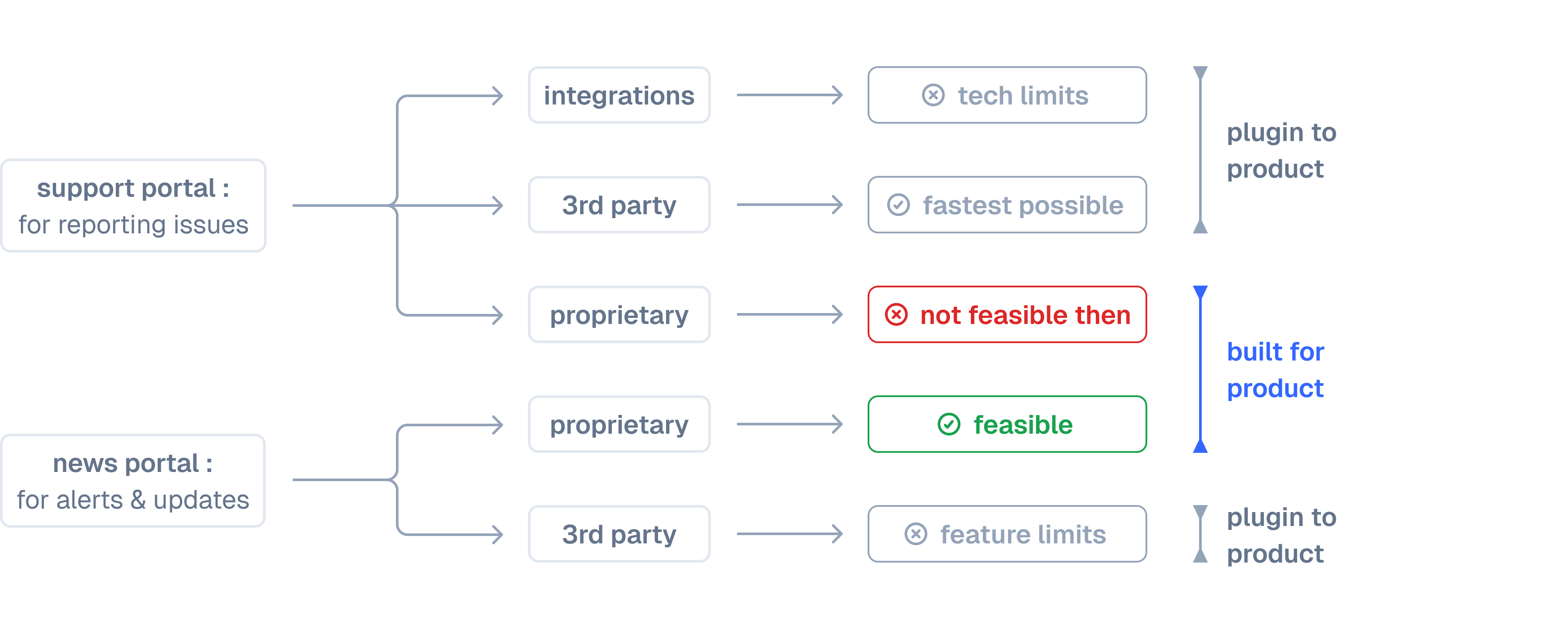
Our goal was to streamline all channels into one – for issues Brands report & updates Appbrew offers.
Solution
First portal for Brands to report issues to Appbrew, via 3rd party.
Solution
Second portal for Appbrew to send all types of updates on product.
Constraint
Time constraints led to prioritising the fastest solutions first & in phases.
Constraint
Shopify integrations & 3rd party tools were easy, but insufficient for all cases.
Constraint
Project launched under legacy design system (updated design system used here).
How Problems were Addressed Again
Our goal with AI was to provide contextual help & be more proactive updates, without relying on complex dev setup or human support.
Solution
Agentic help as first line of support for all day-to-day issues.
Solution
Setup Brand context with the agent for personalised support & updates.

Constraint
Human support was still preferred by many customers for complex problems.
Constraint
Project launched under legacy design system (updated design system used here).
DESIGN
Crafting the Interface
Access to Portal
Support & Updates are product-wide features, for which I iterated for the right amount of attention.
ITR-1
ITR-2
ITR-Shipped


Help & Updates Portal
A similar popup design is used for both portals, given their similar global nature & purposes.
Help Popup
Updates Popup
Timely Alerts


Access to Help with Milo
After Milo, the help popup is rethought to better integrate with Milo, while keeping the same functions.
ITR-1
ITR-2
ITR-Shipped


Help with Milo AI
Complete capabilities of Milo are highlighted better, given complete control over the portal.
ITR-Draft
ITR-Shipped


Solving Issues with Milo
The systems we setup during Phase I are used by Milo to address all problems & raise request as needed.
Guiding Users on Chat
Raising Support Requests


OUTCOME
the Aftermath
What Changed
Outcome
No issues were missed with Pylon's ticket management system integrated.
Outcome
Reduced app compliance errors & system issues, with proactive alerts via Updates.
Outcome
Increase in usage of new features, as they're featured under Updates.
Outcome
Support team's workload reduced, with higher & faster resolutions.
What Changed
Outcome
Milo addresses 50–80% of routine issues, replacing manual support.
Outcome
Issues resolved in minutes, instead of days of waiting for Support team.
Outcome
Customers use Milo to diagnose issues & plan long-term solutions ahead of time.
What to Improve Next
Up Next
Milo-led proactive insights, strategies or automated actions
Up Next
Personalised industry-relevant recommendations
Up Next
Maintain memory across all past chat threads
Up Next
Milo "humanised" like an Appbrew member.
MORE